Large language models are quickly becoming intermediaries between consumers and merchants’ websites. Making your site easy for AI crawlers to access and engage with is more than visibility. It drives buying decisions too.
Here are three checks to ensure your site is AI-ready
Bot Access
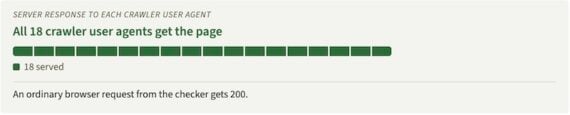
A free tool from former Googler Vanessa Fox can test whether a site is AI-accessible.
There are many ways to inadvertently prevent AI crawlers, such as server-side blocking of unknown bots and automatically generated robots.txt files.
Vanessa Fox, a former Google employee who created Webmaster Central (now Search Console), has created a free tool that (i) reviews robots.txt for AI-crawler access, and (ii) uses known user-agent strings of prominent AI platforms to test how a site responds to those crawlers.
The test isn’t foolproof because it doesn’t use each crawler’s published IP address. Some sites and networks verify bots by IP, so the actual crawlers could get a different response. Still, it is a solid check of whether your site, server, or content delivery network blocks the bots you want.
Old-school SEO
Years ago, when Google’s crawler was less advanced, organic search optimizers copied an entire sentence from a web page and searched for it in parentheses. The tactic forced Google to find the exact sequence, confirming the page was indexed.
Fast forward to 2026, and AI crawlers, like Google years ago, do not consistently parse JavaScript. Thus we can apply a similar approach to determine whether a page’s content is AI-bot readable. Copy a sentence that’s not immediately visible, such as collapsible FAQ answers, and prompt ChatGPT:
Find this sentence, state the URL where it is used, and cite the sentence preceding it: [SENTENCE].
If successful, ChatGPT can likely access and retrieve all content on the page, including JavaScript-powered.
Chrome Reading Mode
AI crawlers typically ignore everything on a web page except the answer to a prompt. To ensure that portion is visible and prominent, open any page in Google Chrome, right-click, and select “Open in Reading Mode” from the drop-down menu.
Chrome’s Reading Mode uses a content-extraction engine called Dom Distiller to isolate the main portion from lesser elements, such as navigation and pop-ups. Instead of just scraping raw code, the engine looks at the live Document Object Model, or DOM.
The result displays only the key elements, such as a product title, description, pricing, and reviews.