Packing 200 orders a day is manageable, but once you grow to 2,000 orders, you’ll need a different fulfillment approach. Methods that work for small numbers often can’t keep up with big spikes.
Ecommerce fulfillment includes everything from when a customer places an order to when it arrives at their door. This means receiving and storing inventory, picking and packing orders, shipping, and handling returns.
And your setup impacts your revenue quickly. Baymard’s checkout research (September 2025) found that among shoppers who abandoned their carts for fulfillment-related reasons: 40% cited extra costs like shipping, 20% mentioned slow delivery, and 13% disliked the returns policy.
Fulfillment systems often show warning signs before they reach their limit. If you notice these signs early, you can make changes before busy periods become overwhelming.
A good fulfillment process should work effectively without constant supervision. If you find yourself checking metrics or counting inventory every day, your system is probably maxed out. But you’ll usually notice these warning signs before it gets this bad.
- Needing to count inventory by hand more than once a week is a sign your system is under stress. As order volumes rise, mistakes become more common, causing inaccurate stock numbers and unexpected backorders.
- Watch your picking accuracy as your product list gets bigger. When you have just a few products, it’s easy to remember them all. But once you have over 100 SKUs, mistakes happen more often and you may spend more time fixing errors than shipping orders.
- A spike in returns commonly signals trouble in your fulfillment process. Mistakes like sending incorrect items or missing delivery windows increase return rates. Slow return processing can throw off inventory numbers even further.
Expanding to more sales channels can accelerate these problems. New regions require adapting to different shipping rules, delivery expectations, and fulfillment locations. Failing to sync inventory in real time across multiple channels increases the risk of running out of stock or overselling.
When you see these problems, it’s time to improve your own processes, think about outsourcing fulfillment, or try a mix of both.
Keeping processes internal
You can often solve accuracy problems by improving your processes before you look for a third-party logistics provider (3PL). This is a good option if your team can handle the number of orders, but your current systems fall short.
Adopting standardized bin locations, barcode scanning, pick lists, and real-time inventory syncing can solve the same problems as a 3PL. This means you keep full control over your customer experience.
When to consider outsourcing
Outsourcing becomes worth considering once capacity — not just process — becomes your biggest challenge. Teams that struggle with seasonal spikes, lack warehouse space, or have customers far from fulfillment centers may benefit from this shift.
Before outsourcing to additional warehouses to reduce delivery times, survey your customers to understand their preferences. Capital One Shopping’s fulfillment research (March, 2026) found that 90% of online shoppers will wait up to 3 days for free shipping, and over 95% prefer free shipping to faster delivery. Therefore, warehouse proximity may be more important for keeping free shipping than for speed.
Check that any provider you consider can sync inventory, tracking, and returns with your store in real time. Seeing these numbers is just as important as solving warehouse problems.
Picking a hybrid model
Most growing brands take this approach. They manage the most important parts themselves and outsource the rest to handle more orders.
You might manage fragile or specialty products yourself and send standard items to the 3PL. The 3PL can handle national shipping, while your team focuses on local delivery, wholesale, and special orders.
Consider this if one part of your business outgrows your current processes before the rest. Move that part to a new solution, but keep your present setup for everything else.
Once you decide to use a 3PL, begin by documenting what your fulfillment operation requires:
- Order volume: Track average daily orders, peak volume, and seasonal spikes.
- SKU count and product complexity: Note variants, bundles, fragile items, high-value products, expiration dates, and tracking needs.
- Packaging requirements: Include branded packaging, inserts, custom boxes, and special handling rules.
- Geographic demand: Identify top shipping regions and the delivery speeds that customers expect.
- Returns volume: Track how often products come back and what happens after inspection.
- Channel mix: Include WooCommerce, marketplaces, wholesale, retail, and social commerce orders.
- Tech stack requirements: List the systems that need fulfillment data, including your ERP, WMS, shipping tools, analytics platform, and customer support tools.
Documenting these requirements helps you quickly tell which providers can support your growth and which only handle warehouse needs.
You can also share the whole profile with an AI assistant to generate your evaluation questions quickly:
Here's my operation: [X] average daily orders, peaking at [Y].

[Z] SKUs, including [variants/bundles/fragile/high-value/expiring].

Selling through [channels]. Top shipping regions: [regions].

Returns run about [%]. Systems that need fulfillment data:

[ERP/WMS/analytics/support].

Write me the questions I should ask a 3PL before signing, and tell me which parts of this profile will cost me the most.
A business with 80 lightweight products and steady sales needs a different 3PL setup than one with 900 products, fragile items, wholesale orders, and large sales spikes in the fourth quarter.
Returns need close attention. The National Retail Federation and Happy Returns say that in 2025, 19.3% of online sales were returned, compared to 15.8% for all retail. If returns make up about a fifth of your orders, reverse logistics is a big deal.
Look for providers that handle returns thoroughly by inspecting items, separating damaged goods, restocking what can be resold, updating order statuses, and keeping your team informed. This approach keeps inventory, customer support, and operations aligned as returns increase.
Total cost of ownership (TCO) will fluctuate as your business evolves and your fulfillment needs change.
Compare provider charges to the amount of work your team does. Multi-item orders, custom inserts, subscription boxes, large products, fragile packaging, and branded materials all affect your actual fulfillment costs.
Most brands underestimate costs like:
- Pick and pack fees: Learn how rates change for multi-item orders, bundles, kits, and custom packing rules.
- Return processing fees: Take a close look at how inspection, restocking, exchanges, disposal, and damaged inventory are managed and billed.
- Special project fees: Ask how the 3PL prices kitting, relabeling, inventory counts, and bulk updates.
- Peak-period surcharges: Confirm whether promotions, holidays, or seasonal spikes change fulfillment pricing.
- Storage fees: Ask how the 3PL charges for bins, shelves, pallets, cubic footage, and long-term inventory.
Your warehouse location can impact your fulfillment costs as much as the fee schedule. For example, if most of your customers are on the West Coast but your 3PL only has a warehouse on the East Coast, you’ll pay more for shipping and deliveries will take longer.
Ask providers where they store inventory and how they recommend splitting stock by region. Digital Commerce 360’s January 2026 trends analysis notes that distributed and regional fulfillment networks are becoming more common due to shipping costs and delivery time pressures.
Find out how the 3PL manages peak-season volume, overflow inventory, and sudden increases in demand.
Orders should transfer automatically from WooCommerce to your fulfillment system, with inventory levels, tracking information, order updates, and return data syncing back to your staff’s daily tools.
Ask each 3PL how its system integration handles daily operations like:
- Inventory sync: How often do stock levels update after sales, returns, transfers, and restocks?
- Tracking sync: Where do tracking numbers appear for customers and internal teams?
- Return status updates: How does the 3PL share inspection, restock, exchange, and refund statuses?
- System compatibility: Does the 3PL connect with your ERP, WMS, analytics tools, and customer support platform?
- API access: Can your team build custom dashboards, order routing rules, or ERP syncs?
Choose a 3PL that provides clear visibility into your order, inventory, tracking, and returns data as your needs evolve. This helps your team stay organized without managing multiple portals or scattered reports.
Reliable fulfillment data becomes just as critical as warehouse space when your operations expand. WooCommerce connects with your 3PL, ERP, WMS, analytics tools, and custom reports to keep all your data in sync.
Effective fulfillment tools address the particular challenges your business faces—whether that’s improving inventory accuracy, streamlining picking, managing returns, or increasing order visibility.
The right tools help you manage complex fulfillment processes smoothly
For those processing hundreds of orders daily, built-in label printing is essential. ShipStation enables you to print USPS, UPS, DHL, and FedEx labels for U.S. shipments directly from your dashboard. It consolidates all your channels and carriers in one place, making it a great solution for those shipping internationally, working with multiple carriers, or selling across platforms.
Scanventory helps you run your warehouse. It uses QR code scanning and bin locations instead of manual logging, which is a must once you have more than 100 SKUs.
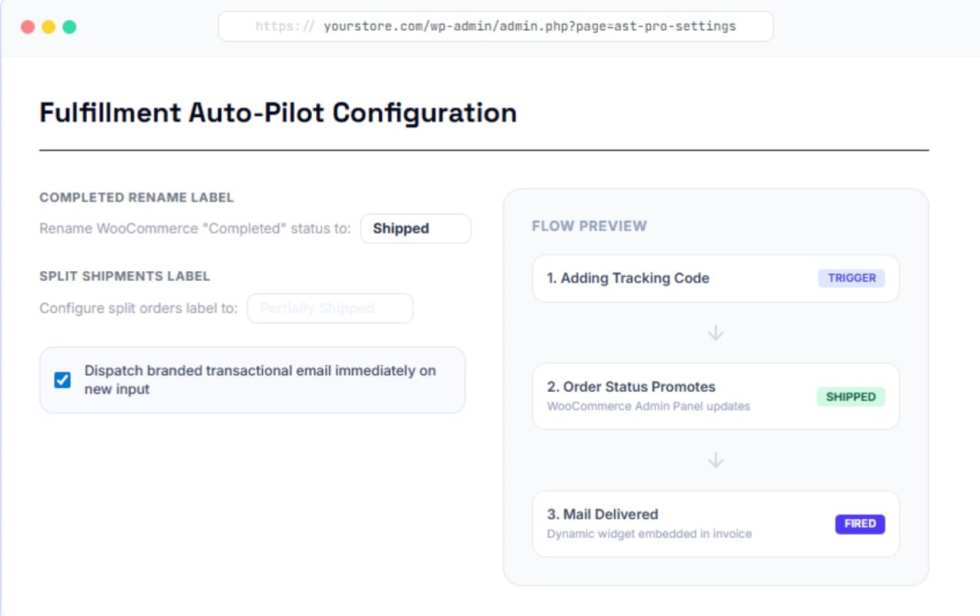
Using outside fulfillment? Advanced Shipment Tracking Pro keeps WooCommerce updated with tracking information, making it easy for both customers and your support team to check shipment status.
Identify which part of your fulfillment process costs you the most, whether it’s inventory, picking, returns, or another area.
Examine what’s causing your inefficiencies. For example, delays in restocking returns might come from slow inspections, slow stock updates, or both. Break down the delays to find the real issue.
WooCommerce extensions can help organize your process, but software alone is not enough. The right data still needs to reach the person making decisions.
Feeling stuck with your ecommerce solution? Let’s talk.

About
Renzo Bojanovich
Renzo is a Product Marketing Manager at Woo. He’s a passionate storyteller with over 8 years of experience formulating and executing successful go-to-market strategies across hardware or SaaS products.