In 2006, Wired magazine editor Chris Anderson famously described the availability of niche products online as the “long tail.” Search optimizers adopted the term, calling queries of three words or more “long-tail keywords.”
Optimizing for long-tail searches has multiple benefits. Consumers searching on extended keywords tend to know what they want, and longer queries typically have less keyword competition. Yet the biggest benefit could now be AI visibility: Generative AI platforms such as ChatGPT fan out using multiword queries to answer user prompts.
Long-Tail Queries
Table of Contents
A seed term plus modifiers
Any long-tail query consists of a seed term and one or more modifiers. For example, “shoes” is a seed term, and potential modifiers are:
- “for women,”
- “red,”
- “near me,”
- “on-sale.”
Combining the seed term and modifiers — “red shoes for women,” “on sale near me” — yields narrow queries that describe searchers’ needs, such as gender, color, location, and price.
Modifiers reflect the searcher’s intent and stage in a buying journey, from exploration to purchase. Thus, keyword research is the process of extending a core term with modifiers to optimize a site for buying journeys.
The more modifiers, the more specific the intent and, typically, the lesser the volume and clicks. Conversely, more modifiers improve the likelihood of conversions, provided the content of the landing page follows closely from that phrase. A query of “red shoes for women” should link to a page with women wearing red shoes.
Types of modifiers
A core term can have many modifiers, such as:
- Location,
- Description (“red”),
- Price (typically from searchers eager to buy),
- Brand,
- Age and gender,
- Questions (“how to clean shoes”).
Long-Tail Opportunities
Keyword research tools
Grouping keywords by modifier type can reveal your audience’s search patterns. Keyword research tools such as Semrush and others can filter lists by modifiers to reveal the most popular.
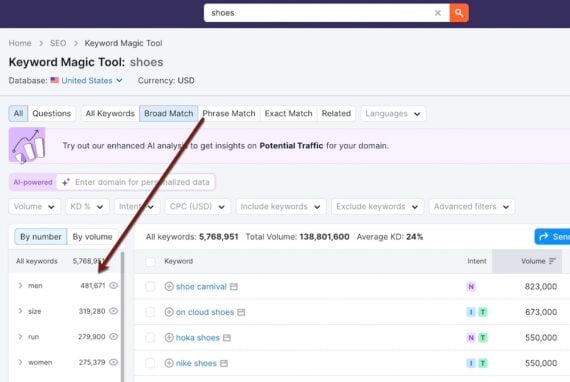
Semrush’s Keyword Magic Tool reveals the most popular modifiers for “shoes.”
Adjust Semrush’s “Advanced filters” to see queries that contain more words.
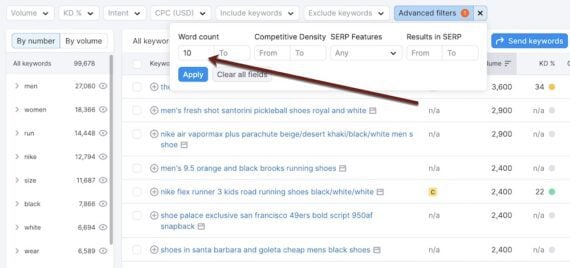
“Advanced filters” reveal queries that contain more words.
Search Console
Regular expressions (regex) in Search Console can identify longer queries, such as fan-out searches from ChatGPT and other genAI platforms. In Search Console, go to “Performance,” click “Add filter,” choose “Query,” and “Custom (regex).”
Then type:
([^” “]*s){10,}?
This regex filters queries to those with more than 10 words. Change “10” to “5” or “25” to find queries longer than 5 or 25 words, respectively.
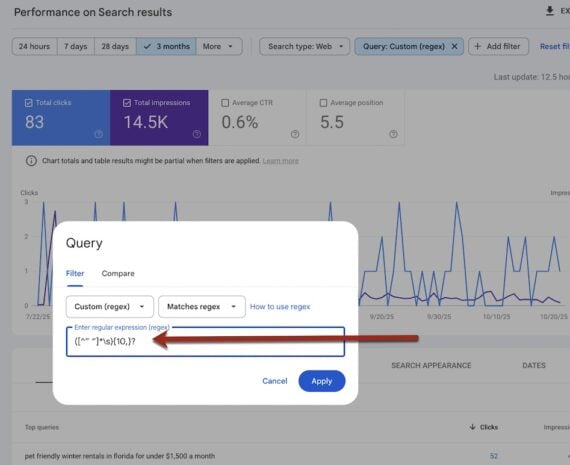
Regex in Search Console can identify longer queries, such as fan-out searches from ChatGPT and other genAI platforms.
Keyword Dos and Don’ts
Search engines no longer match queries to exact word strings on web pages, focusing instead on the searcher’s intent or meaning. Hence a query for “red shoes for women” could produce an organic listing for “maroon slippers for busy moms.”
Keyword optimization circa 2025 reflects this evolution.
- Avoid stuffing a page with keywords. Instead, enrich content with synonyms and related phrases.
- Don’t create a page with variations of a single keyword. Group pages by modifiers and optimize for the entire group.
- Include the main keyword in the page title and the H1 heading. Google could use either of those to create the all-important search snippet.
- Assign products to only one category. Don’t confuse Google (and genAI platforms) by creating multiple categories for the same item to target different keywords.
- Search Google (and genAI platforms) for your target query and study the results. Are there other opportunities, such as images and videos?
- Don’t force an exact match keyword if it’s awkward or grammatically incorrect. Ask yourself, “How would I search for this item?” In other words, write for people, not search engines.